
Why Use This Feature?
If a member can’t sign in, you no longer need to contact Support. You can now trigger a password reset email instantly, helping your member regain access and reducing delays for both of you.
Step-by-Step Instructions
-
Log in to your LegitFit admin dashboard.
-
Go to the Clients tab.
-
Select the client who needs a password reset.
-
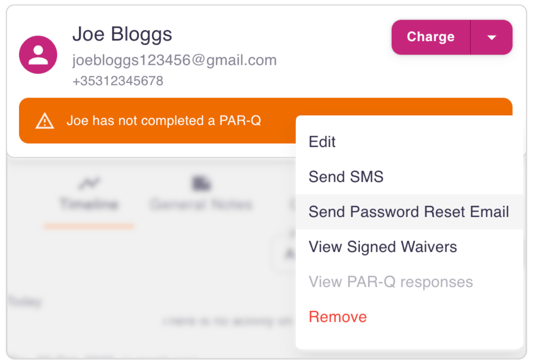
Click the dropdown arrow beside the Charge button.
-
Select Send Password Reset Email.
-
The member will receive an email with a secure link.
-
Once they click the link, they can set a new password and log in immediately.
What Happens Next
Your member will be able to reset their password and access their account without needing further help from you or the support team.
Success Tip
Ask the member to check their spam or promotions folder if they don’t see the email within a couple of minutes.